If you’re building a website to support your freelance business, side hustle, or passion project, choosing the right web host is a make-or-break decision.
You need something fast, reliable, and affordable—without a tech degree to get it up and running.
That’s where Hostinger comes in.
Over the past few years, I’ve hosted multiple websites with Hostinger—from client projects to my own niche blogs. What stood out? The insanely easy setup, daily automatic backups (huge for peace of mind), and performance that punched way above its price point.
In this review, I’ll walk you through my real-world experience using Hostinger, breaking down where it shines, where it falls short, and who it’s best for—especially if you’re working from home and building your digital empire one page at a time.
How Fast and Reliable Is Hostinger? (Hint: Surprisingly Solid)
Let’s cut to what matters—is Hostinger fast and stable enough to run your business?
Short answer: Yes. And it’s honestly better than I expected for the price.
⚡️ Speed Test: LiteSpeed Servers = Quick Load Times
Hostinger uses LiteSpeed web servers, which are optimized for high performance—especially with WordPress. On sites I’ve hosted with Hostinger, I’ve consistently experienced fast load times—even without extra caching plugins. Independent tests from tools like GTmetrix and PageSpeed Insights also show many Hostinger-hosted WordPress sites loading in under 1.5 seconds.
You also get built-in caching and access to Cloudflare CDN if you want an extra boost.

🔴 Uptime: Consistently Over 99.9%
Across multiple sites I’ve hosted with Hostinger, I’ve experienced rock-solid uptime—no major outages or unexplained downtime. Independent tests also back this up, with tools like UptimeRobot showing an average of 99.97% uptime across typical user sites.
🧰 WordPress Optimization
If you’re using WordPress (like most remote entrepreneurs do), Hostinger makes setup seamless.
One-click install? ✅
Auto-updates? ✅
Staging environment (on higher-tier plans)? ✅
They also preinstall a WordPress starter kit, so you don’t start with a blank slate.
Getting Started with Hostinger: So Easy, It Feels Like Cheating
When you’re juggling client work, Zoom calls, and maybe a toddler in the next room, you don’t have time to wrestle with clunky tech.
That’s why ease of use matters—and Hostinger nails it.
🧠 Setup That Makes Sense (Even If You’re Not a Techie)
From the moment you sign up, Hostinger walks you through everything.
There’s no confusing cPanel jungle—just their clean, intuitive hPanel, built for regular humans.
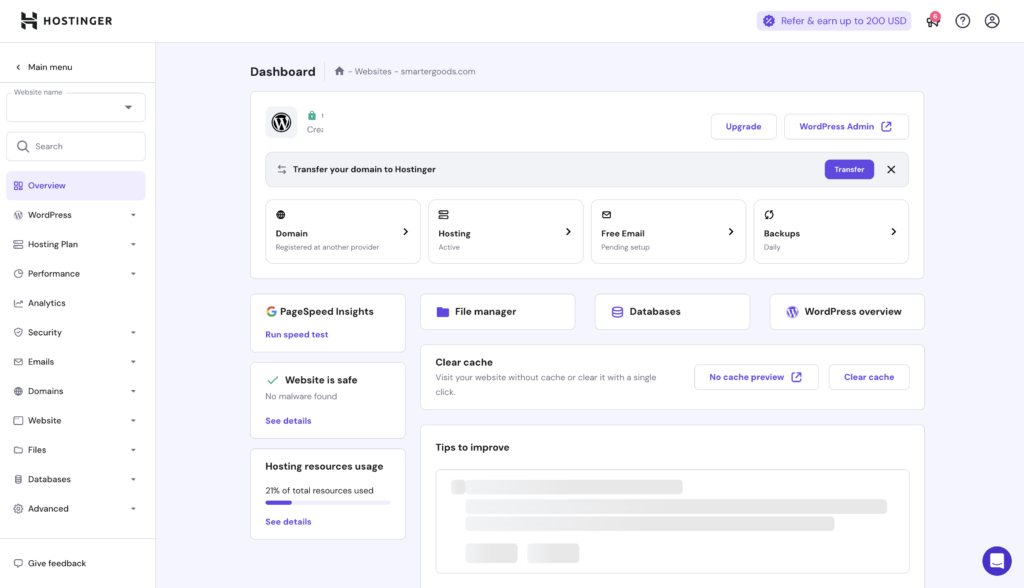
Need to install WordPress? One click.
Connecting a domain? Done in minutes.
Launching a new site? You’ll be up and running before your next coffee refill.
🛠️ Tools That Actually Help
Hostinger includes a WordPress Starter Kit, which gives you themes, essential plugins, and a basic site structure to get going fast. You’re not stuck staring at a blank screen, wondering where to start.
They also offer guided setup wizards for:
- Setting up email accounts
- Installing SSL (free)
- Managing backups
- Creating staging environments (on certain plans)
Hostinger Pricing: Cheap, But Not “Too Good to Be True”
Let’s talk money. Because when you’re running a business from home, every dollar counts.
The good news? Hostinger is one of the most affordable web hosts out there.
The better news? It doesn’t feel like “budget” hosting.
💰 How Much Does Hostinger Cost?
Hostinger’s shared hosting plans start at $2.99/month (with a 48-month commitment). That gets you:
- One website
- Free SSL
- Free email
- Weekly backups
- 100 GB bandwidth
Need more? The Premium and Business plans offer:
- Unlimited websites
- Daily backups (huge win)
- Free domain
- More storage and bandwidth
📝 Tip: The longer you commit upfront, the better the deal. But keep an eye on renewal rates—they go up after the initial term.
🔎 Is It Really “Cheap Web Hosting”?
Yes—but not in the way that feels risky or sketchy.
Unlike some cheap hosts that nickel-and-dime you for basics (like backups or support), Hostinger gives you real features at low prices.
You’re not sacrificing performance, security, or usability.
You’re just skipping the brand name markup.
Free Daily Backups: Hostinger’s Secret Superpower
Here’s something most hosts don’t shout about—daily backups usually cost extra.
Not with Hostinger.
On their Business plan and above, you get automatic daily backups included. No plugins, no third-party add-ons, no extra fees. Just reliable, behind-the-scenes protection.
🔒 Easy Recovery When You Need It
Restoring your site is super simple. Inside Hostinger’s control panel, you can roll back your files, database, or even your entire site with just a few clicks.
No support ticket needed. No waiting.
🛡️ Built-In Security Without the Drama

Hostinger also includes:
Malware scanner (on some plans)
Free SSL certificates (let’s encrypt)
DDoS protection
Two-factor authentication
You don’t need to be a security expert to keep your site safe. Hostinger does the heavy lifting behind the scenes.
Who Is Hostinger Best For?
Not every host is built with the work-from-home crowd in mind. But Hostinger? It fits like a glove.
After hosting several of my own sites with them, here’s who I think will love it most:
👩💼 Freelancers & Solopreneurs
If you’re a one-person show building a portfolio, blog, or online business, Hostinger checks every box:
- Easy setup (no tech headaches)
- Affordable plans that don’t blow your budget
- Reliable performance and uptime
- Daily backups in case things go sideways
- In short, it might be the best web hosting for freelancers who need power without the complexity.
🏪 Small Business Owners
Whether you’re running an online store, a local service business, or a niche content site, Hostinger’s value is hard to beat.
You get solid hosting, WordPress tools, email, and security features—without hiring a web guy.
🌎 Remote Workers with a Side Hustle
Building a passion project after hours? Starting a blog to build authority in your field? Selling a digital product?
Hostinger is fast, cheap, and secure enough to get your idea online without burning your weekend.
Hostinger vs the Competition: How It Stacks Up
There’s no shortage of hosting companies out there. But how does Hostinger hold up against the big names like Bluehost, GoDaddy, or HostGator?
Let’s break it down.
🏈 Hostinger vs Bluehost
Bluehost is popular—especially for beginners. But it comes with a higher price tag and a heavier interface (hello, old-school cPanel).
Hostinger wins on:
- Lower pricing (especially long-term)
- Faster performance (LiteSpeed vs Apache)
- Free daily backups (Bluehost charges extra or only includes them on high-tier plans)
✅ Winner: Hostinger – more value for the money, with simpler setup and better speed.
🏈 Hostinger vs GoDaddy
GoDaddy’s known for domains, but as a host? It’s bloated and upsell-heavy.
Hostinger advantages:
- Cleaner dashboard (GoDaddy is cluttered and dated)
- Free backups (GoDaddy charges separately)
- Faster WordPress experience
✅ Winner: Hostinger – better user experience and way fewer hidden fees.
🏈 Hostinger vs HostGator
HostGator used to be the go-to budget host. But lately? It’s fallen behind on speed and support.
Hostinger has the edge with:
- LiteSpeed servers (HostGator still uses older tech)
- Daily backups included
- Faster site load times out of the box
✅ Winner: Hostinger – faster, simpler, and safer (especially for WordPress users).
Final Verdict: Is Hostinger Worth It?
If you’re building a business, blog, or brand from home, you don’t need the most expensive hosting.
You need hosting that’s:
- Fast 🚨
- Reliable 🟢
- Easy to use 🧠
- Affordable 💰
- And gives you peace of mind with daily backups 🛡️
It’s not perfect (renewal rates do jump, and phone support isn’t available), but the value is seriously hard to beat. For freelancers, solopreneurs, and side-hustlers, Hostinger hits the sweet spot between price and performance.
Ready to give it a shot?
👉 Try Hostinger Here – and get up to 80% off